熱門: 51單片機(jī) | 24小時(shí)必答區(qū) | 單片機(jī)教程 | 單片機(jī)DIY制作 | STM32 | Cortex M3 | 模數(shù)電子 | 電子DIY制作 | 音響/功放 | 拆機(jī)樂園 | Arduino | 嵌入式OS | 程序設(shè)計(jì)

熱門: 51單片機(jī) | 24小時(shí)必答區(qū) | 單片機(jī)教程 | 單片機(jī)DIY制作 | STM32 | Cortex M3 | 模數(shù)電子 | 電子DIY制作 | 音響/功放 | 拆機(jī)樂園 | Arduino | 嵌入式OS | 程序設(shè)計(jì)
|
發(fā)布時(shí)間: 2020-7-9 21:07
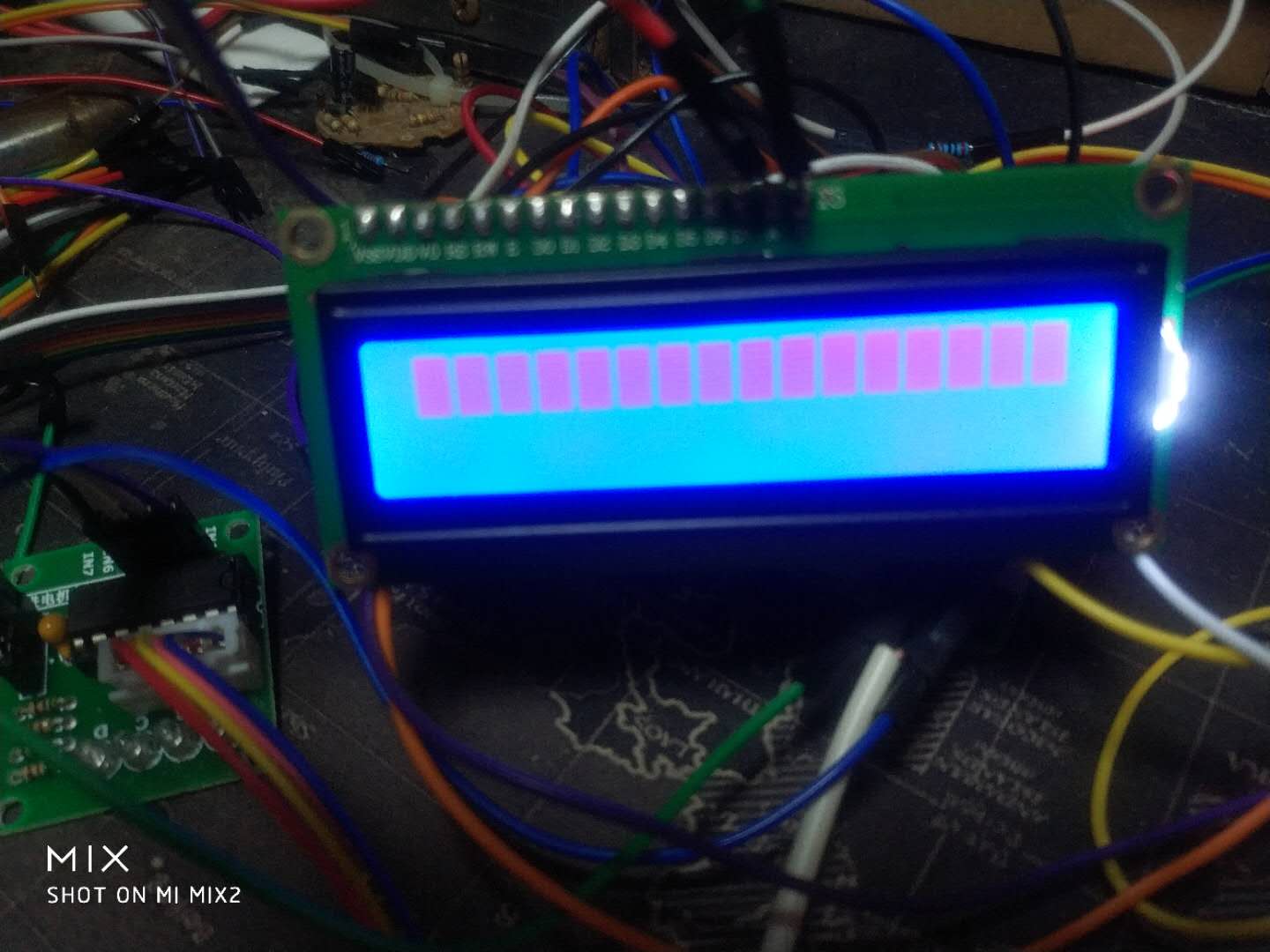
正文摘要:大神幫我看看哪兒的問題 #include<reg52.h> #define uchar unsigned char #define uint unsigned int sbit rs=P2^0; sbit wr=P2^1; sbit en=P2^2; uint i,j; delay(uint x) { ... |

欣語寶貝 發(fā)表于 2020-7-10 21:13 請(qǐng)問你是怎么讓lcd初始化成功的,我現(xiàn)在也遇到了相同的問題,解決不了 |

wulin 發(fā)表于 2020-7-10 06:32 加延時(shí)貌似不太管用,我也是碰到了這個(gè)問題,按照您的方法,在程序里添加了延時(shí),但是問題依舊 |

| 有寫命令寫數(shù)據(jù),還得要有忙檢測(cè)才行,不過你好像已經(jīng)弄好了,我就來蹭蹭哈哈哈哈 |
| 參與人數(shù) 1 | 黑幣 +20 | 收起 理由 |
|---|---|---|
 admin admin
| + 20 | 回帖助人的獎(jiǎng)勵(lì)! |

欣語寶貝 發(fā)表于 2020-7-10 22:11 第一,硬件方面,1602的V0口對(duì)比度電阻沒有調(diào)好,液晶顯示對(duì)比度很差 第二、字母是可以顯示的,你看一下1602的資料,不支持漢字顯示,支持部分自定義字符。 直接把數(shù)字替換成字母應(yīng)該就可以正常顯示的,除非你用了全角輸入的。 |
| 參與人數(shù) 1 | 黑幣 +20 | 收起 理由 |
|---|---|---|
|
admin
| + 20 | 回帖助人的獎(jiǎng)勵(lì)! |

wulin 發(fā)表于 2020-7-10 06:32 根據(jù)你修改的代碼 不能初始化  是不是1602lcd壞了? 是不是1602lcd壞了? |
|
只能幫你這么多了 #include<reg52.h> #define uint unsigned int #define uchar unsigned char sbit rs=P2^0; sbit rw=P2^1; sbit en=P2^2; void delay(uint n) { uint x,y; for(x=n;x>0;x--) for(y=110;y>0;y--); } void lcd_wcom(uchar com) { rs=0; rw=0; P0=com; delay(5); en=1; en=0; } void lcd_wdat(uchar dat) { rs=1; rw=0; P0=dat; delay(5); en=1; en=0; } void lcd_init() { lcd_wcom(0x38); lcd_wcom(0x0c); lcd_wcom(0x06); lcd_wcom(0x01); } void main() { lcd_init(); lcd_wcom(0x80); lcd_wdat('a'); delay(200); while(1); } |
wulin 發(fā)表于 2020-7-10 06:32 好的 等下試一下 謝謝 |
static 發(fā)表于 2020-7-10 07:59 等下去實(shí)驗(yàn)下 謝謝了 |
楊雪飛 發(fā)表于 2020-7-10 09:15 等下回去試試謝謝啦 |
| 錯(cuò)誤太多,我的水平有限,還是沒有全部解決。 |
|
1、主程序中使用了延時(shí)函數(shù),但是這個(gè)延時(shí)函數(shù)之前沒有聲明; 2、延時(shí)函數(shù)寫的有誤,僅5個(gè)周期; 3、主函數(shù)中沒有設(shè)定指針,也就是字符顯示的初始位置。 你按照下邊的改一下試試吧。改動(dòng)的地方我用了紅色 #include<reg52.h> #define uchar unsigned char #define uint unsigned int void Delay() ; sbit rs=P2^0; sbit wr=P2^1; sbit en=P2^2; void delay(uint z) { uint x,y; for(x=z;x>0;x--) for(y=19;y>0;y--); } void write_com(uchar com) { rs=0; wr=0; en=0; P1=com; en=1; delay(5); en=0; } void write_data(uchar bat) { rs=1; wr=0; en=0; P1=bat; en=1; delay(5); en=0; } void init() { write_com(0x38); write_com(0x08); write_com(0x01); write_com(0x06); write_com(0x0f); } void main() { init(); write_com(0x80); write_data('A'); while(1); } |
|
void main() { init(); 在這里加一句 write_com(0x80); 這個(gè)寫命令是設(shè)置你寫的數(shù)據(jù)的起始位置,0x80是第一行第一位 write_data("A"); while(1); } |

| 仿真玩的時(shí)候可以不判忙,不接晶振與電源,實(shí)際操作是少不了的! |

|
由于對(duì)LCD讀寫數(shù)據(jù)之前沒有判忙,所以延時(shí)函數(shù)時(shí)間就嫌短,導(dǎo)致初始化失敗,建議延時(shí)1ms左右。 void write_com(uchar com) { rs=0; wr=0; en=0; P1=com; delay(100); en=1; delay(100); en=0; } void write_data(uchar bat) { rs=1; wr=0; en=0; P1=bat; delay(100); en=1; delay(100); en=0; } |
Powered by 單片機(jī)教程網(wǎng)

 組圖打開中,請(qǐng)稍候......
 收藏
收藏 頂
頂 踩
踩
