欧美极品高清xxxxhd,国产日产欧美最新,无码AV国产东京热AV无码,国产精品人与动性XXX,国产传媒亚洲综合一区二区,四库影院永久国产精品,毛片免费免费高清视频,福利所导航夜趣136

 找回密碼
 立即注冊

QQ登錄

只需一步,快速開始

搜索
查看: 2704|回復: 3
收起左側

為什么仿真液晶無顯示

[復制鏈接]
ID:678280 發表于 2021-10-15 12:00 | 顯示全部樓層 |閱讀模式
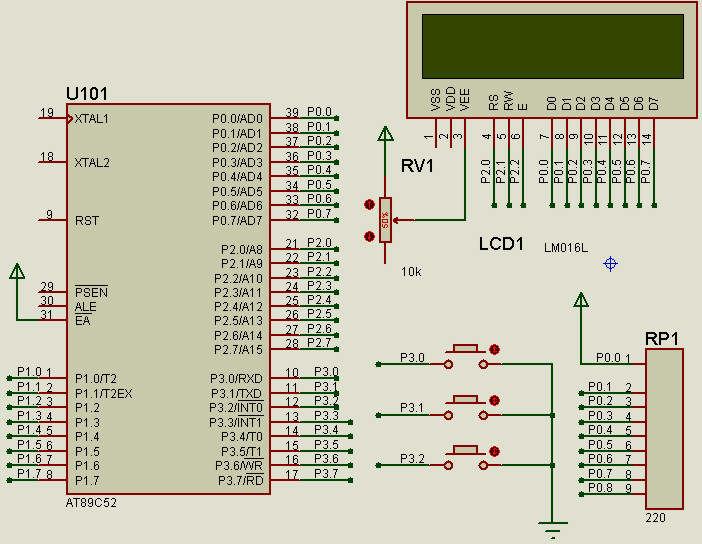
請教了,不知錯在哪里,仿真時液晶就是啥都沒有。謝謝。
未命名.jpg

回復

使用道具 舉報

ID:678280 發表于 2021-10-15 12:01 | 顯示全部樓層
上圖的代碼

#include<reg52.h>
#include<string.h>
#define uchar unsigned char
#define uint unsigned int
void Initialize_LCD();
void DelayMS(uint ms);
void ShowString(uchar,uchar,uchar *);
sbit K1=P3^0;
sbit K2=P3^1;
sbit K3=P3^2;
uchar code Prompt[]="Press K1 - K3 To Start Demo Prog";
//待滾動顯示的信息段落,每行不超過80個字符,共6行
uchar const Line_Count=6;       
uchar code Msg[][80]=
{
        "Many CAD users dismiss schematic capture as a necessary evil in the ",
        "process of creating PCB layout but we have always disputed this point ",
        "of view. With PCB layout now offering automation of both component ",
        "can often be the most time consuming element of the exercise.",
        "And if you use circuit simulation to develop your ideas, ",
        "you are going to spend even more time working on the schematic."
};
//顯示緩沖(2行)
uchar Disp_Buffer[32];

void V_Scroll_Display() //垂直滾動顯示
{
        uchar i,j,k=0;
        uchar *p=Msg[0];
        uchar *q=Msg[Line_Count]+strlen(Msg[Line_Count]);
        //以下僅使用顯示緩沖的前16字節空間
        while(p<q)
        {
                for(i=0;i<16&&p<q;i++)
                {        //消除顯示緩沖中待顯示行首尾可能出現的空格
                        if((i==0||i==15)&&*p==' ') p++;
                        if(*p!='\0')
                        {
                                Disp_Buffer[i]=*p++;
                        }
                        else
                        {
                                if(++k>Line_Count) break;
                                p=Msg[k];                                        //p指向下一串的首地址
                                Disp_Buffer[i]=*p++;
                        }
                }
                //不足16個字符時空格補充
                for(j=i;j<16;j++) Disp_Buffer[j]=' ';
                //垂直滾動顯示
                while(F0) DelayMS(5);
                ShowString(0,0,"                 ");
                DelayMS(150);
                while(F0) DelayMS(5);
                ShowString(0,1,Disp_Buffer);
                DelayMS(150);
                while(F0) DelayMS(5);
                ShowString(0,0,Disp_Buffer);
                ShowString(0,1,"                 ");
                DelayMS(150);
        }
        //最后清屏
        ShowString(0,0,"                 ");
        ShowString(0,1,"                 ");
}

void H_Scroll_Display()//水平滾動顯示
{
        uchar i,j,k=0,L=0;
        uchar *p=Msg[0];
        uchar *q=Msg[Line_Count]+strlen(Msg[Line_Count]);
        //將32個字符的顯示緩沖前16個字符設為空格
        for(i=0;i<16;i++) Disp_Buffer[i]=' ';
        while(p<q)
        {
                //忽略緩沖中首尾可能出現的空格
                if((i==16||i==31)&&*p==' ') p++;
                for(i=16;i<32&&p<q;i++)
                {       
                        if(*p!='\0')
                        {
                                Disp_Buffer[i]=*p++;
                        }
                        else
                        {
                                if(++k>Line_Count) break;
                                p=Msg[k];                                        //p指向下一串的首地址
                                Disp_Buffer[i]=*p++;
                        }
                }
                //不足32個字符時空格補充
                for(j=i;j<32;j++) Disp_Buffer[j]=' ';
                //水平滾動顯示
                for(i=0;i<=16;i++)
                {
                        while(F0) DelayMS(5);
                        ShowString(0,L,Disp_Buffer+i);
                        while(F0) DelayMS(5);
                        DelayMS(20);
                }
                L=(L==0)?1:0;                //行號在0,1間交替
                DelayMS(300);
        }
        //如果顯示結束時停留在第0行,則清除第1行的內容
        if(L==1) ShowString(0,1,"                 ");       
}

void EX_INT0() interrupt 0//外部中斷0,由K3控制暫停與繼續顯示
{
  F0=!F0;                //暫停與繼續顯示控制標志位
}

void main()
{
        uint Count=0;
        IE=0x81;                //允許外部中斷0
        IT0=1;                        //下降沿觸發
        F0=0;                        //暫停與繼續顯示控制標志位
        Initialize_LCD();
        ShowString(0,0,Prompt);
        ShowString(0,1,Prompt+16);
        while(1)
        {
                if(K1==0)
                {
                        V_Scroll_Display();
                        DelayMS(300);
                }
                else
                if(K2==0)
                {       
                        H_Scroll_Display();
                        DelayMS(300);       
                }
        }
}
回復

使用道具 舉報

ID:752974 發表于 2021-10-16 11:29 | 顯示全部樓層
仿真中用到的器件要有相應的仿真數學模型,有的器件缺這個模型,就不能仿真,可以換一個試試。
回復

使用道具 舉報

ID:856329 發表于 2021-10-16 12:11 | 顯示全部樓層
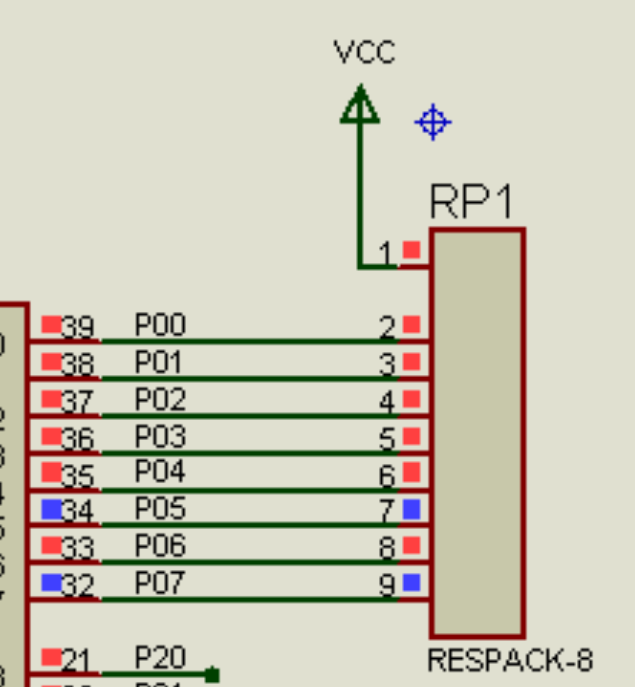
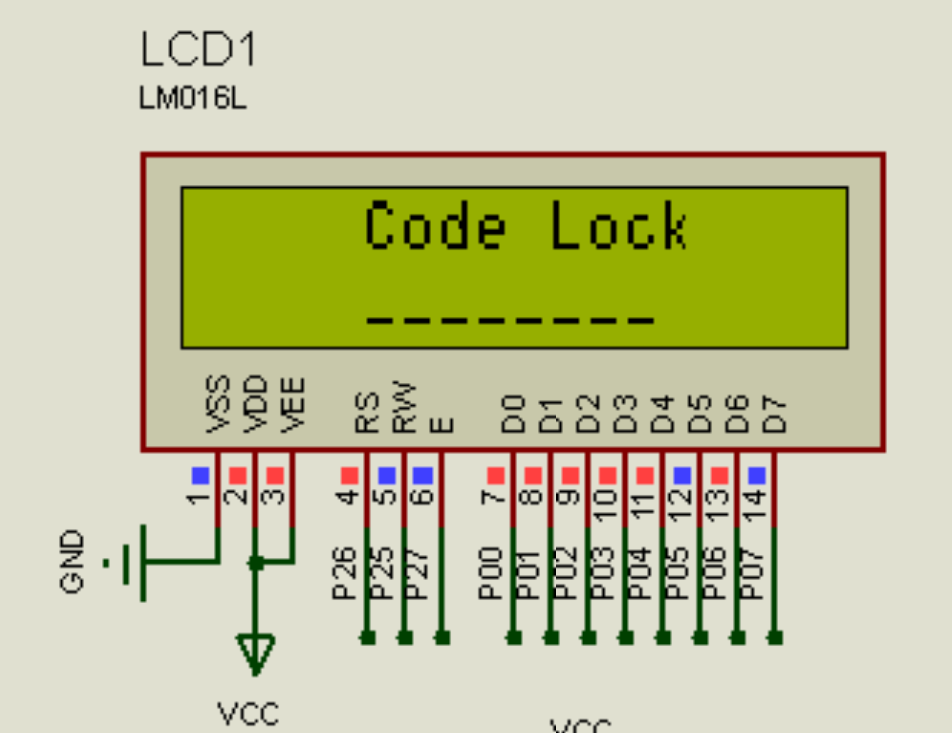
樓主,仿真圖中排阻網絡標號錯位,lcd不確定是否有錯。
另外,程序中沒有看到lcd控制引腳的定義。
以下是我仿真的lcd1602和排阻接法,可以參考。
Screenshot_2021-10-16-12-03-08-328_com.miui.gallery.png Screenshot_2021-10-16-12-02-58-359_com.miui.gallery.png
自用的lcd1602驅動奉上,僅供參考
Lcd1602驅動.zip (1.67 KB, 下載次數: 2)

回復

使用道具 舉報

您需要登錄后才可以回帖 登錄 | 立即注冊

本版積分規則

小黑屋|51黑電子論壇 |51黑電子論壇6群 QQ 管理員QQ:125739409;技術交流QQ群281945664

Powered by 單片機教程網

快速回復 返回頂部 返回列表