|
發布時間: 2019-3-13 11:03
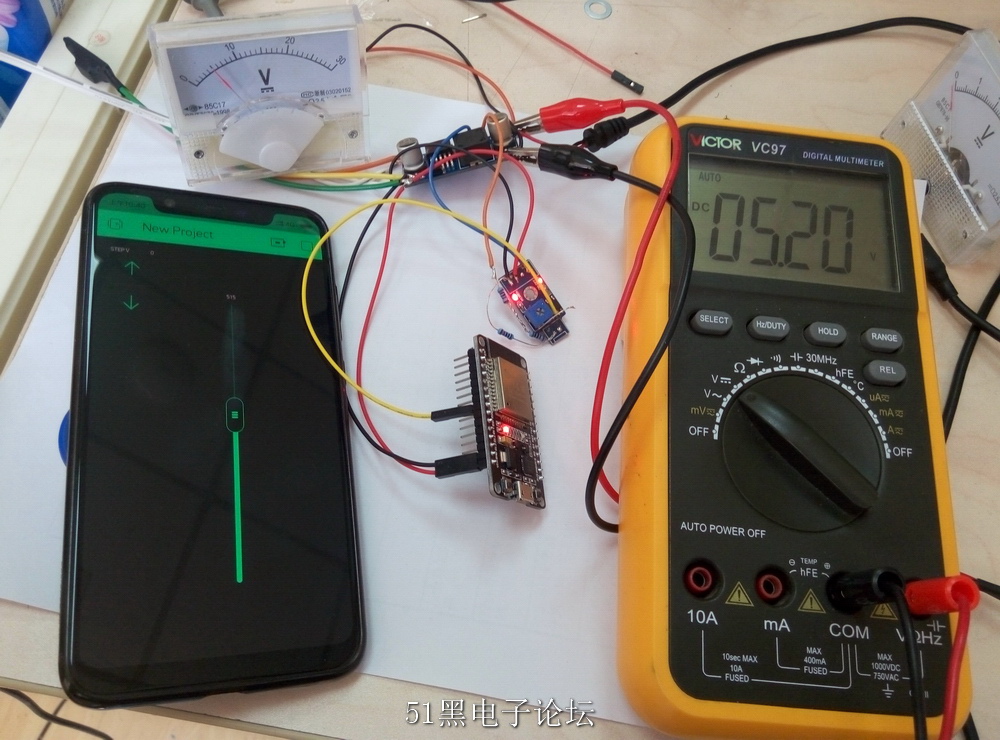
正文摘要:一直想弄個數控電源,今天把手里的東西搜羅一下感覺可以整在一起就動手了,事后算了一下成本, 35元左右,而且都是淘寶可以買到的東西 電壓用手機軟件調節 lm2596 DCDC降壓模塊¥4.00Mini360 DCDC¥2.00 ... |

| EP32的開發環境搭建可以講講 ESP32 上的程序 基于 Arduino |
| 不錯的玩法 贊一個 |

| 不錯的文章,學習了 |

| 好文章,收藏一個先。 |

|
ESP32 上的程序 基于 Arduino 和 Blynk /************************************************************* Download latest Blynk library here: https://github.com/blynkkk/blynk-library/releases/latest Blynk is a platform with iOS and Android apps to control Arduino, Raspberry Pi and the likes over the Internet. You can easily build graphic interfaces for all your projects by simply dragging and dropping widgets. Blynk library is licensed under MIT license This example code is in public domain. ************************************************************* This example runs directly on ESP32 chip. Note: This requires ESP32 support package: https://github.com/espressif/arduino-esp32 Please be sure to select the right ESP32 module in the Tools -> Board menu! Change WiFi ssid, pass, and Blynk auth token to run :) Feel free to apply it to any other example. It's simple! *************************************************************/ /* Comment this out to disable prints and save space */ #define BLYNK_PRINT Serial #include <WiFi.h> #include <WiFiClient.h> #include <BlynkSimpleEsp32.h> // You should get Auth Token in the Blynk App. // Go to the Project Settings (nut icon). char auth[] = "your_auth"; //改成你自己的 auth // Your WiFi credentials. // Set password to "" for open networks. char ssid[] = "wifi_name"; //改成你自己的 wifi 名稱 char pass[] = "wifi_password"; //改成你自己的 wifi 密碼 int powerPin = 25; //dac輸出腳 BLYNK_WRITE(V1) { float tmpVal; tmpVal = param.asInt(); tmpVal = tmpVal / 100; // assigning incoming value from pin V1 to a variable tmpVal = tmpVal / 6; //根據分壓電阻調整系數 tmpIntVal = tmpVal * 256 /3.3; dacWrite(powerPin, tmpIntVal); } void setup() { // Debug console Serial.begin(115200); Blynk.begin(auth, ssid, pass); } void loop() { Blynk.run(); } |
admin 發表于 2019-3-13 22:08 明天補上 |

| 樓主能分享制作資料嗎? |

 組圖打開中,請稍候......
 收藏
收藏 頂
頂 踩
踩