標題: MATLAB實現語音識別功能課設含代碼 [打印本頁]
作者: WAKENNNN 時間: 2018-11-20 17:23
標題: MATLAB實現語音識別功能課設含代碼
《智能儀器》課程設計
題 目: MATLAB實現語音識別功能
目錄
設計任務及要求1
語音識別的簡單介紹
2.1語者識別的概念2
2.2特征參數的提取3
2.3用矢量量化聚類法生成碼本3
2.4VQ的說話人識別 4
算法程序分析
3.1函數關系.4
3.2代碼說明5
3.2.1函數mfcc5
3.2.2函數disteu5
3.2.3函數vqlbg.6
3.2.4函數test6
3.2.5函數testDB7
3.2.6 函數train8
3.2.7函數melfb8
演示分析.9
心得體會.11
附:GUI程序代碼12
用MATLAB實現簡單的語音識別功能;
具體設計要求如下:
用MATLAB實現簡單的數字1~9的語音識別功能。
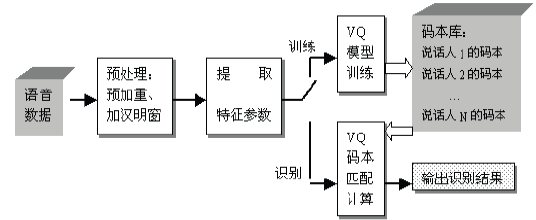
基于VQ的說話人識別系統,矢量量化起著雙重作用。在訓練階段,把每一個說話者所提取的特征參數進行分類,產生不同碼字所組成的碼本。在識別(匹配)階段,我們用VQ方法計算平均失真測度(本系統在計算距離d時,采用歐氏距離測度),從而判斷說話人是誰。
語音識別系統結構框圖如圖1所示。
圖1 語音識別系統結構框圖
2.1語者識別的概念
語者識別就是根據說話人的語音信號來判別說話人的身份。語音是人的自然屬性之一,由于說話人發音器官的生理差異以及后天形成的行為差異,每個人的語音都帶有強烈的個人色彩,這就使得通過分析語音信號來識別說話人成為可能。用語音來鑒別說話人的身份有著許多獨特的優點,如語音是人的固有的特征,不會丟失或遺忘;語音信號的采集方便,系統設備成本低;利用電話網絡還可實現遠程客戶服務等。因此,近幾年來,說話人識別越來越多的受到人們的重視。與其他生物識別技術如指紋識別、手形識別等相比較,說話人識別不僅使用方便,而且屬于非接觸性,容易被用戶接受,并且在已有的各種生物特征識別技術中,是唯一可以用作遠程驗證的識別技術。因此,說話人識別的應用前景非常廣泛:今天,說話人識別技術已經關系到多學科的研究領域,不同領域中的進步都對說話人識別的發展做出了貢獻。說話人識別技術是集聲學、語言學、計算機、信息處理和人工智能等諸多領域的一項綜合技術,應用需求將十分廣闊。在吃力語音信號的時候如何提取信號中關鍵的成分尤為重要。語音信號的特征參數的好壞直接導致了辨別的準確性。
2.2特征參數的提取
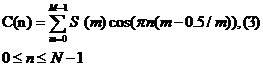
對于特征參數的選取,我們使用mfcc的方法來提取。MFCC參數是基于人的聽覺特性利用人聽覺的屏蔽效應,在Mel標度頻率域提取出來的倒譜特征參數。
MFCC參數的提取過程如下:
- 1. 對輸入的語音信號進行分幀、加窗,然后作離散傅立葉變換,獲得頻譜分布信息。
設語音信號的DFT為:
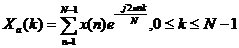
(1)
其中式中x(n)為輸入的語音信號,N表示傅立葉變換的點數。
- 2. 再求頻譜幅度的平方,得到能量譜。
- 3. 將能量譜通過一組Mel尺度的三角形濾波器組。
我們定義一個有M個濾波器的濾波器組(濾波器的個數和臨界帶的個數相近),采用的濾波器為三角濾波器,中心頻率為f(m),m=1,2,3,···,M
本系統取M=100。
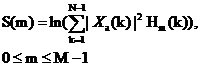 (2)
(2)其中

為三角濾波器的頻率響應。
MFCC系數個數通常取20—30,常常不用0階倒譜系數,因為它反映的是頻譜能量,故在一般識別系統中,將稱為能量系數,并不作為倒譜系數,本系統選取20階倒譜系數。
2.3用矢量量化聚類法生成碼本
我們將每個待識的說話人看作是一個信源,用一個碼本來表征。碼本是從該說話人的訓練序列中提取的MFCC特征矢量聚類而生成。只要訓練的序列足夠長,可認為這個碼本有效地包含了說話人的個人特征,而與講話的內容無關。
本系統采用基于分裂的LBG的算法設計VQ碼本,
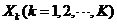
為訓練序列,B為碼本。
具體實現過程如下:
- 1. 取提取出來的所有幀的特征矢量的型心(均值)作為第一個碼字矢量B1。
- 2. 將當前的碼本Bm根據以下規則分裂,形成2m個碼字。
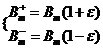 (4)
(4)
其中m從1變化到當前的碼本的碼字數,ε是分裂時的參數,本文ε=0.01。
- 3. 根據得到的碼本把所有的訓練序列(特征矢量)進行分類,然后按照下面兩個公式計算訓練矢量量化失真量的總和
 以及相對失真(n為迭代次數,初始n=0,
 =∞,B為當前的碼書),若相對失真小于某一閾值ε,迭代結束,當前的碼書就是設計好的2m個碼字的碼書,轉5。否則,轉下一步。
量化失真量和:

(5)
相對失真:

(6)
4. 重新計算各個區域的新型心,得到新的碼書,轉3。
5. 重復2 ,3 和4步,直到形成有M個碼字的碼書(M是所要求的碼字數),其中D0=10000。
2.4 VQ的說話人識別
設是未知的說話人的特征矢量

,共有T幀是訓練階段形成的碼書,表示碼書第m個碼字,每一個碼書有M個碼字。再計算測試者的平均量化失真D,并設置一個閾值,若D小于此閾值,則是原訓練者,反之則認為不是原訓練者。
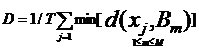
(7)
在具體的實現過程當中,采用了matlab軟件來幫助完成這個項目。在matlab中主要由采集,分析,特征提取,比對幾個重要部分。以下為在實際的操作中,具體用到得函數關系和作用一一列舉在下面。
3.1函數關系
主要有兩類函數文件Train.m和Test.m
在Train.m調用Vqlbg.m獲取訓練錄音的vq碼本,而[url=]Vqlbg.m調用mfcc.m獲取單個錄音的mel倒譜系數[/url],接著mfcc.m調用Melfb.m---將能量譜通過一組Mel尺度的三角形濾波器組。
在Test.m函數文件中調用Disteu.m計算訓練錄音(提供vq碼本)與測試錄音(提供mfcc)mel倒譜系數的距離,即判斷兩聲音是否為同一錄音者提供。[url=]Disteu.m調用mfcc.m獲取單個錄音的mel倒譜系數[/url]。mfcc.m調用Melfb.m---將能量譜通過一組Mel尺度的三角形濾波器組。
3.2具體代碼說明
3.2.1函數mffc:
function r = mfcc(s, fs)
---
m = 100;
n = 256;
l = length(s);
nbFrame = floor((l - n) / m) + 1; %沿-∞方向取整
for i = 1:n
for j = 1:nbFrame
M(i, j) = s(((j - 1) * m) + i); %對矩陣M賦值
end
end
h = hamming(n); %加 hamming 窗,以增加音框左端和右端的連續性
M2 = diag(h) * M;
for i = 1:nbFrame
frame(:,i) = fft(M2(:, i)); %對信號進行快速傅里葉變換FFT
end
t = n / 2;
tmax = l / fs;
m = melfb(20, n, fs); %將上述線性頻譜通過Mel 頻率濾波器組得到Mel 頻譜,下面在將其轉化成對數頻譜
n2 = 1 + floor(n / 2);
z = m * abs(frame(1:n2, :)).^2;
r = dct(log(z)); %將上述對數頻譜,經過離散余弦變換(DCT)變換到倒譜域,即可得到Mel 倒譜系數(MFCC參數)
3.2.2函數disteu
---計算測試者和模板碼本的距離
function d = disteu(x, y)
[M, N] = size(x); %音頻x賦值給【M,N】
[M2, P] = size(y); %音頻y賦值給【M2,P】
if (M ~= M2)
error('不匹配!') %兩個音頻時間長度不相等
end
d = zeros(N, P);
if (N < P)%在兩個音頻時間長度相等的前提下
copies = zeros(1,P);
for n = 1:N
d(n,:) = sum((x(:, n+copies) - y) .^2, 1);
end
else
copies = zeros(1,N);
for p = 1:P
d(:,p) = sum((x - y(:, p+copies)) .^2, 1)';
end%%成對歐氏距離的兩個矩陣的列之間的距離
end
d = d.^0.5;
3.2.3函數vqlbg
---該函數利用矢量量化提取了音頻的vq碼本
function r = vqlbg(d,k)
e = .01;
r = mean(d, 2);
dpr = 10000;
for i = 1:log2(k)
r = [r*(1+e), r*(1-e)];
while (1 == 1)
z = disteu(d, r);
[m,ind] = min(z, [], 2);
t = 0;
for j = 1:2^i
r(:, j) = mean(d(:, find(ind == j)), 2);
x = disteu(d(:, find(ind == j)), r(:, j));
for q = 1:length(x)
t = t + x(q);
end
end
if (((dpr - t)/t) < e)
break;
else
dpr = t;
end
end
end
3.2.4函數test
function finalmsg = test(testdir, n, code)
for k = 1:n % read test sound file of each speaker
file = sprintf('%ss%d.wav', testdir, k);
[s, fs] = wavread(file);
v = mfcc(s, fs); % 得到測試人語音的mel倒譜系數
distmin = 4; %閾值設置處
% 就判斷一次,因為模板里面只有一個文件
d = disteu(v, code{1}); %計算得到模板和要判斷的聲音之間的“距離”
dist = sum(min(d,[],2)) / size(d,1); %變換得到一個距離的量
%測試閾值數量級
msgc = sprintf('與模板語音信號的差值為:%10f ', dist);
disp(msgc);
%此人匹配
if dist <= distmin %一個閾值,小于閾值,則就是這個人。
msg = sprintf('第%d位說話者與模板語音信號匹配,符合要求!\n', k);
finalmsg = '此位說話者符合要求!'; %界面顯示語句,可隨意設定
disp(msg);
end
%此人不匹配
if dist > distmin
msg = sprintf('第%d位說話者與模板語音信號不匹配,不符合要求!\n', k);
finalmsg = '此位說話者不符合要求!'; %界面顯示語句,可隨意設定
disp(msg);
end
end
3.2.5函數testDB
這個函數實際上是對數據庫一個查詢,根據測試者的聲音,找相應的文件,并且給出是誰的提示
function testmsg = testDB(testdir, n, code)
nameList={'1','2','3','4','5','6','7','8','9' }; %這個是我們要識別的9個數
for k = 1:n % 數據庫中每一個說話人的特征
file = sprintf('%ss%d.wav', testdir, k); %找出文件的路徑
[s, fs] = wavread(file);
v = mfcc(s, fs); % 對找到的文件取mfcc變換
distmin = inf;
k1 = 0;
for l = 1:length(code)
d = disteu(v, code{l});
dist = sum(min(d,[],2)) / size(d,1);
if dist < distmin
distmin = dist;%%這里和test函數里面一樣 但多了一個具體語者的識別
k1 = l;
end
end
msg=nameList{k1}
msgbox(msg);
end
3.2.6 函數train
---該函數就是對音頻進行訓練,也就是提取特征參數
function code = train(traindir, n)
k = 16; % number of centroids required
for i = 1:n % 對數據庫中的代碼形成碼本
file = sprintf('%ss%d.wav', traindir, i);
disp(file);
[s, fs] = wavread(file);
v = mfcc(s, fs); % 計算 MFCC's 提取特征特征,返回值是Mel倒譜系數,是一個log的dct得到的
code{i} = vqlbg(v, k); % 訓練VQ碼本 通過矢量量化,得到原說話人的VQ碼本
end
3.2.7 函數melfb
---確定矩陣的濾波器
function m = melfb(p, n, fs)
f0 = 700 / fs;
fn2 = floor(n/2);
lr = log(1 + 0.5/f0) / (p+1);
% convert to fft bin numbers with 0 for DC term
bl = n * (f0 * (exp([0 1 p p+1] * lr) - 1));
直接轉換為FFT的數字模型
b1 = floor(bl(1)) + 1;
b2 = ceil(bl(2));
b3 = floor(bl(3));
b4 = min(fn2, ceil(bl(4))) - 1;
pf = log(1 + (b1:b4)/n/f0) / lr;
fp = floor(pf);
pm = pf - fp;
r = [fp(b2:b4) 1+fp(1:b3)];
c = [b2:b4 1:b3] + 1;
v = 2 * [1-pm(b2:b4) pm(1:b3)];
m = sparse(r, c, v, p, 1+fn2);
我們的功能分為兩部分:對已經保存的9個數字的語音進行辨別和實時的判斷說話人說的是否為一個數.在前者的實驗過程中,先把9個數字的聲音保存成wav的格式,放在一個文件夾中,作為一個檢測的數據庫.然后對檢測者實行識別,系統給出提示是哪個數字.
在第二個功能中,實時的錄取一段說話人的聲音作為模板,提取mfcc特征參數,隨后緊接著進行遇著識別,也就是讓其他人再說相同的話,看是否是原說話者.
實驗過程及具體功能如下:
先打開Matlab 使Current Directory為錄音及程序所所在的文件夾
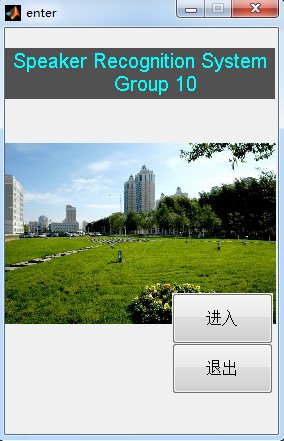
再打開文件“enter.m”,點run運行,打開enter界面,點擊“進入”按鈕進入系統。(注:文件包未封裝完畢,目前只能通過此方式打開運行。)(如下圖figure1)
figure1
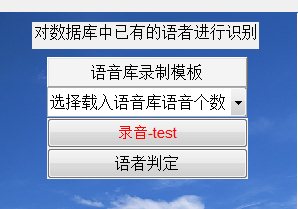
在對數據庫中已有的語者進行識別模塊:
選擇載入語音庫語音個數;
點擊語音庫錄制模版進行已存語音信息的提取;
點擊錄音-test進行現場錄音;
點擊語者判斷進行判斷數字,并顯示出來。
在實時語者識別模塊:
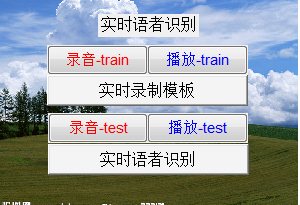
點擊實時錄制模板上的“錄音-train”按鈕,是把新語者的聲音以wav格式存放在”實時模板”文件夾中, 接著點擊“實時錄制模板”,把新的模板提取特征值。隨后點擊實時語者識別模板上的“錄音-train”按鈕,是把語者的聲音以wav格式存放在”測試”文件夾中,再點擊“實時語者識別”,在對測得的聲音提取特征值的同時,和實時模板進行比對,然后得出是否是實時模板中的語者。另外面板上的播放按鈕都是播放相對應左邊錄取的聲音。
想要測量多次,只要接著錄音,自動保存,然后程序比對音頻就可以。
退出只要點擊菜單File/Exit,退出程序。
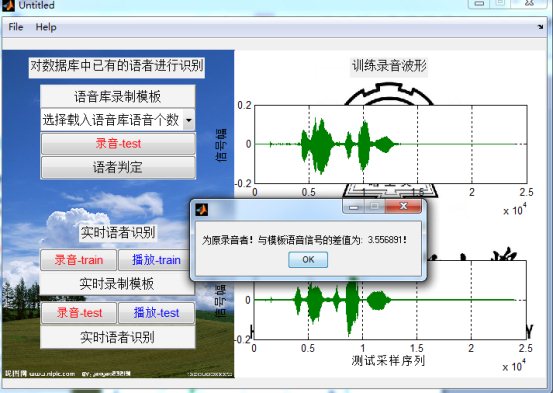
程序運行截圖:
(fig.2)運行后系統界面
實驗表明,該系統能較好地進行語音的識別,同時,基于矢量量化技術 (VQ)的語音識別系統具有分類準確,存儲數據少,實時響應速度快等綜合性能好的特點.
矢量量化技術在語音識別的應用方面,尤其是在孤立詞語音識別系統中得到很好的應用,特別是有限狀態矢量量化技術,對于語音識別更為有效。
通過這次課程設計,我對語音識別有了更加形象化的認識,也強化了MATLAB的應用,對將來的學習奠定了基礎。
附:GUI程序代碼
- function varargout = untitled2(varargin)
- % UNTITLED2 M-file for untitled2.fig
- % UNTITLED2, by itself, creates a new UNTITLED2 or raises the existing
- % singleton*.
- %
- % H = UNTITLED2 returns the handle to a new UNTITLED2 or the handle to
- % the existing singleton*.
- %
- % UNTITLED2('CALLBACK',hObject,eventData,handles,...) calls the local
- % function named CALLBACK in UNTITLED2.M with the given input arguments.
- %
- % UNTITLED2('Property','Value',...) creates a new UNTITLED2 or raises the
- % existing singleton*. Starting from the left, property value pairs are
- % applied to the GUI before untitled2_OpeningFunction gets called. An
- % unrecognized property name or invalid value makes property application
- % stop. All inputs are passed to untitled2_OpeningFcn via varargin.
- %
- % *See GUI Options on GUIDE's Tools menu. Choose "GUI allows only one
- % instance to run (singleton)".
- %
- % See also: GUIDE, GUIDATA, GUIHANDLES
-
- % Copyright 2002-2003 The MathWorks, Inc.
-
- % Edit the above text to modify the response to help untitled2
-
- % Last Modified by GUIDE v2.5 08-Jun-2010 23:58:57
- % Begin initialization code - DO NOT EDIT
- gui_Singleton = 1;
- gui_State = struct('gui_Name', mfilename, ...
- 'gui_Singleton', gui_Singleton, ...
- 'gui_OpeningFcn', @untitled2_OpeningFcn, ...
- 'gui_OutputFcn', @untitled2_OutputFcn, ...
- 'gui_LayoutFcn', [] , ...
- 'gui_Callback', []);
- if nargin && ischar(varargin{1})
- gui_State.gui_Callback = str2func(varargin{1});
- end
- if nargout
- [varargout{1:nargout}] = gui_mainfcn(gui_State, varargin{:});
- else
- gui_mainfcn(gui_State, varargin{:});
- end
- % End initialization code - DO NOT EDIT
- % --- Executes just before untitled2 is made visible.
- function untitled2_OpeningFcn(hObject, eventdata, handles, varargin)
- % This function has no output args, see OutputFcn.
- % hObject handle to figure
- % eventdata reserved - to be defined in a future version of MATLAB
- % handles structure with handles and user data (see GUIDATA)
- % varargin command line arguments to untitled2 (see VARARGIN)
- % Choose default command line output for untitled2
- handles.output = hObject;
- % Update handles structure
- guidata(hObject, handles);
- axes(findobj('tag','axes13'));
- imshow('3.jpg');
- axes(findobj('tag','axes12'));
- imshow('1.jpg');
- % UIWAIT makes untitled2 wait for user response (see UIRESUME)
- % uiwait(handles.figure1);
- % --- Outputs from this function are returned to the command line.
- function varargout = untitled2_OutputFcn(hObject, eventdata, handles)
- % varargout cell array for returning output args (see VARARGOUT);
- % hObject handle to figure
- % eventdata reserved - to be defined in a future version of MATLAB
- % handles structure with handles and user data (see GUIDATA)
- % Get default command line output from handles structure
- varargout{1} = handles.output;
- % --- Executes on button press in pushbutton1.
- function pushbutton1_Callback(hObject, eventdata, handles)
- % hObject handle to pushbutton1 (see GCBO)
- % eventdata reserved - to be defined in a future version of MATLAB
- % handles structure with handles and user data (see GUIDATA)
- Channel_Str=get(handles.popupmenu3,'String');
- Channel_Number=str2double(Channel_Str{get(handles.popupmenu3,'Value')});
- global moodle;
- moodle = train('模版\',Channel_Number) %??′y?óó?ò???DDìáè???±?
- % --- Executes on button press in pushbutton2.
- function pushbutton2_Callback(hObject, eventdata, handles)
- % hObject handle to pushbutton2 (see GCBO)
- % eventdata reserved - to be defined in a future version of MATLAB
- % handglobal data1;
- global moodle ;
- test('測試\',1,moodle)%êμê±ó?ò??ì2a
- % --------------------------------------------------------------------
- function Open_Callback(hObject, eventdata, handles)
- % hObject handle to Open (see GCBO)
- % eventdata reserved - to be defined in a future version of MATLAB
- % handles structure with handles and user data (see GUIDATA)
- [filename,pathname]=uigetfile('')
- file=get(handles.edits,[filename,pathname])
- [y,f,b]=wavread(file);
- % --------------------------------------------------------------------
- function Exit_Callback(hObject, eventdata, handles)
- % hObject handle to Exit (see GCBO)
- % eventdata reserved - to be defined in a future version of MATLAB
- % handles structure with handles and user data (see GUIDATA)
- exit
- % --------------------------------------------------------------------
- function About_Callback(hObject, eventdata, handles)
- % hObject handle to About (see GCBO)
- % eventdata reserved - to be defined in a future version of MATLAB
- % handles structure with handles and user data (see GUIDATA)
- H=['語者識別']
- helpdlg(H,'help text')
- % --------------------------------------------------------------------
- function File_Callback(hObject, eventdata, handles)
- % hObject handle to File (see GCBO)
- % eventdata reserved - to be defined in a future version of MATLAB
- % handles structure with handles and user data (see GUIDATA)
- % --------------------------------------------------------------------
- function Edit_Callback(hObject, eventdata, handles)
- % hObject handle to Edit (see GCBO)
- % eventdata reserved - to be defined in a future version of MATLAB
- % handles structure with handles and user data (see GUIDATA)
- % --------------------------------------------------------------------
- function Help_Callback(hObject, eventdata, handles)
- % hObject handle to Help (see GCBO)
- % eventdata reserved - to be defined in a future version of MATLAB
- % handles structure with handles and user data (see GUIDATA)
- % --- Executes on button press in pushbutton7.
- function pushbutton7_Callback(hObject, eventdata, handles)
- % hObject handle to pushbutton7 (see GCBO)
- % eventdata reserved - to be defined in a future version of MATLAB
- % handles structure with handles and user data (see GUIDATA)
- msg='請速度錄音?'
- msgbox(msg)
- clear
- global data1;
- %global dataDN1;
- AI = analoginput('winsound');
- chan = addchannel(AI,1:2);
- duration = 3; %1 second acquisition
- set(AI,'SampleRate',8000)
- ActualRate = get(AI,'SampleRate');
- set(AI,'SamplesPerTrigger',duration*ActualRate)
- set(AI,'TriggerType','Manual')
- blocksize = get(AI,'SamplesPerTrigger');
- Fs = ActualRate;
- start(AI)
- trigger(AI)
- [data1,time,abstime,events] = getdata(AI);
- fname=sprintf('E:\\Matlab語音識別系統\\實時模版\\s1.wav')
- %dataDN1=wden(data1,'heursure','s','one',5,'sym8');denoise
- wavwrite(data1,fname)
- msgbox(fname)
- % --- Executes on button press in pushbutton8.
- function pushbutton8_Callback(hObject, eventdata, handles)
- % hObject handle to pushbutton8 (see GCBO)
- % eventdata reserved - to be defined in a future version of MATLAB
- % handles structure with handles and user data (see GUIDATA)
- global data1;
- %global dataDN1;
- sound(data1)
- %sound(dataDN1)
- axes(handles.axes1)%set to plot at axes1
- plot(data1);
- %plot(dataDN1);
- xlabel('訓練采樣序列'),ylabel('信號幅');
- %xlabel('?μá·2é?ùDòáD'),ylabel('sym8D?2¨?μ??oóμ?D?o?·ù');
- grid on;
- clear
- % --- Executes on button press in pushbutton9.
- function pushbutton9_Callback(hObject, eventdata, handles)
- % hObject handle to pushbutton9 (see GCBO)
- % eventdata reserved - to be defined in a future version of MATLAB
- % handles structure with handles and user data (see GUIDATA)
- msg='請速度錄音?'
- msgbox(msg)
- clear
- global data2;
- %global dataDN2;
- AI = analoginput('winsound');
- chan = addchannel(AI,1:2);
- duration = 3; %1 second acquisition
- set(AI,'SampleRate',8000)
- ActualRate = get(AI,'SampleRate');
- set(AI,'SamplesPerTrigger',duration*ActualRate)
- set(AI,'TriggerType','Manual')
- blocksize = get(AI,'SamplesPerTrigger');
- Fs = ActualRate;
- start(AI)
- trigger(AI)
- [data2,time,abstime,events] = getdata(AI);
- fname=sprintf('E:\\Matlab語音識別系統\\測試\\s1.wav')
- %dataDN1=wden(data1,'heursure','s','one',5,'sym8');denoise
- wavwrite(data2,fname)
- msgbox(fname)
- % --- Executes on button press in pushbutton10.
- function pushbutton10_Callback(hObject, eventdata, handles)
- % hObject handle to pushbutton10 (see GCBO)
- % eventdata reserved - to be defined in a future version of MATLAB
- % handles structure with handles and user data (see GUIDATA)
- global data2;
- %global dataDN2;
- sound(data2)
- %sound(dataDN2)
- axes(handles.axes2)%set to plot at axes1
- plot(data2);
- %plot(dataDN2);
- xlabel('測試采樣序列'),ylabel('信號幅');
- %xlabel('2aê?2é?ùDòáD'),ylabel('sym8D?2¨?μ??oóμ?D?o?·ù');%%
- grid on;
- clear
- % --- Executes on button press in pushbutton11.
- function pushbutton11_Callback(hObject, eventdata, handles)
- % hObject handle to pushbutton11 (see GCBO)
- % eventdata reserved - to be defined in a future version of MATLAB
- % handles structure with handles and user data (see GUIDATA)
- global moodle ;
- testDB('測試\',1,moodle)
- % --- Executes on button press in pushbutton12.
- function pushbutton12_Callback(hObject, eventdata, handles)
- % hObject handle to pushbutton12 (see GCBO)
- % eventdata reserved - to be defined in a future version of MATLAB
- % handles structure with handles and user data (see GUIDATA)
- global moodle;
- moodle = train('實時模板\',1)
- % --- Executes on selection change in popupmenu3.
- function popupmenu3_Callback(hObject, eventdata, handles)
- % hObject handle to popupmenu3 (see GCBO)
- % eventdata reserved - to be defined in a future version of MATLAB
- % handles structure with handles and user data (see GUIDATA)
- % Hints: contents = get(hObject,'String') returns popupmenu3 contents as cell array
- % contents{get(hObject,'Value')} returns selected item from popupmenu3
- str=get(handles.popupmenu3,'String');
- val=str2num(str{get(handles.popupmenu3,'Value')});
- switch val
- case 1
- case 2
- case 3
- case 4
- case 5
- case 6
- case 7
- case 8
- case 9
- end
- % --- Executes during object creation, after setting all properties.
- function popupmenu3_CreateFcn(hObject, eventdata, handles)
- % hObject handle to popupmenu3 (see GCBO)
- % eventdata reserved - to be defined in a future version of MATLAB
- % handles empty - handles not created until after all CreateFcns called
- % Hint: popupmenu controls usually have a white background on Windows.
- % See ISPC and COMPUTER.
- if ispc && isequal(get(hObject,'BackgroundColor'), get(0,'defaultUicontrolBackgroundColor'))
- set(hObject,'BackgroundColor','white');
- end
- % --- Executes on button press in pushbutton9.
- function pushbutton13_Callback(hObject, eventdata, handles)
- % hObject handle to pushbutton9 (see GCBO)
- % eventdata reserved - to be defined in a future version of MATLAB
- % handles structure with handles and user data (see GUIDATA)
- % --- Executes on button press in pushbutton10.
- function pushbutton14_Callback(hObject, eventdata, handles)
- % hObject handle to pushbutton10 (see GCBO)
- % eventdata reserved - to be defined in a future version of MATLAB
- % handles structure with handles and user data (see GUIDATA)
- % --- Executes during object creation, after setting all properties.
- %function axes8_CreateFcn(hObject, eventdata, handles)
- % hObject handle to axes8 (see GCBO)
- % eventdata reserved - to be defined in a future version of MATLAB
- % handles empty - handles not created until after all CreateFcns called
-
- % Hint: place code in OpeningFcn to populate axes8
-
完整的Word格式文檔51黑下載地址:
 matlab語音識別系統(源代碼).doc
(580.5 KB, 下載次數: 164)
matlab語音識別系統(源代碼).doc
(580.5 KB, 下載次數: 164)
2018-11-20 17:22 上傳
點擊文件名下載附件
下載積分: 黑幣 -5
作者: kayhzk 時間: 2019-1-8 21:22
兄弟,你的源代碼打不開
作者: 123...@... 時間: 2020-6-3 11:28
enter m文件在哪里
作者: BUSHIJUN 時間: 2020-6-7 18:51
同求enter m 文件
作者: youyouxhz 時間: 2020-9-17 09:14
做的工作比較多呀
作者: youyouxhz 時間: 2020-9-17 09:14
樓主下了一番功夫呢
| 歡迎光臨 (http://m.raoushi.com/bbs/) |
Powered by Discuz! X3.1 |